
ABOUT |
PROJECT LIFECYCLE |
TECHNICAL SUPPORT |
PROJECT LIFECYCLE
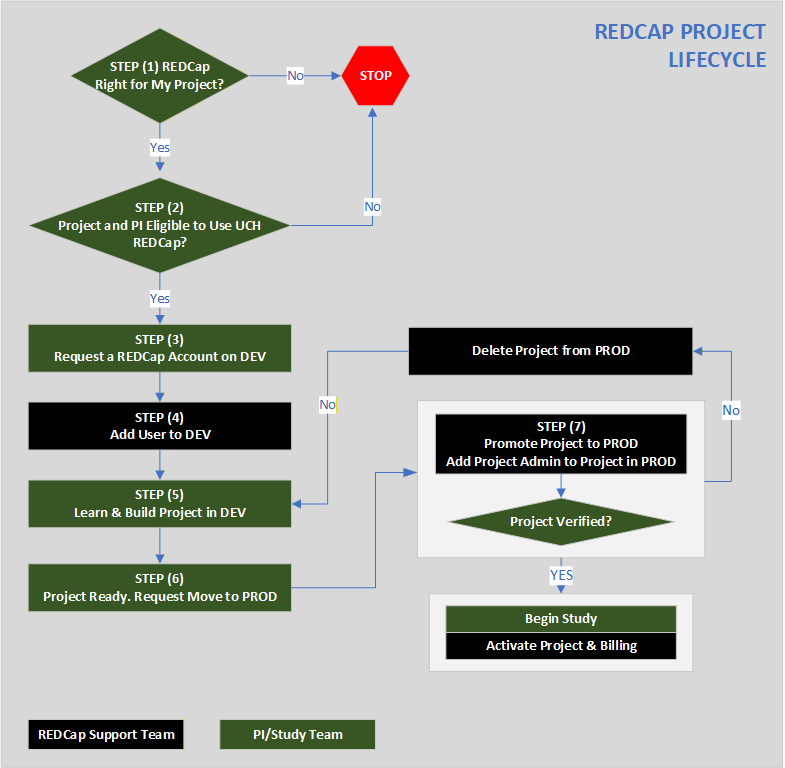
The diagram below provides an overview of the REDCap project lifecycle, from the initial determination of whether REDCap is appropriate for the project through project development, regulatory approval, promotion to Production, activation, and ongoing study management. It identifies the respective responsibilities of the PI/Study Team and the REDCap Support Team and highlights key decision points, including project eligibility, IRB approval, Production verification, and change control.
STEP (1): Determine Suitability of REDCap for Project
Click on the “ABOUT” link above to age to learn more about REDCap’s capabilities and features and determine whether it can meet the specific requirements of your project.
STEP (2): Determine PI and Project Eligibility to Use REDCap
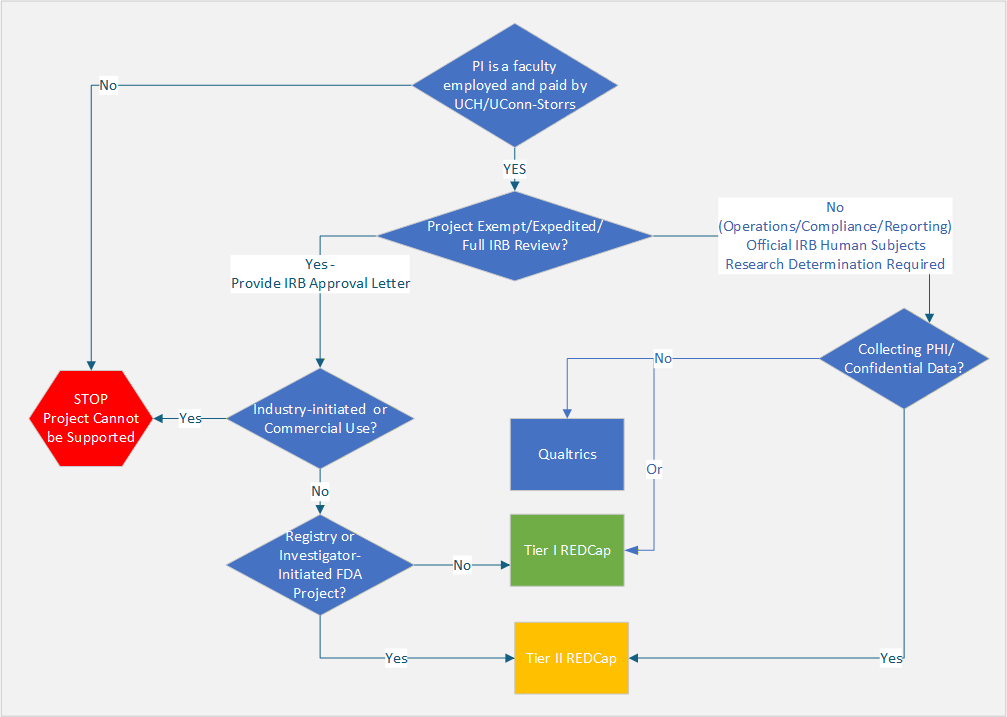
The rubric above provides a graphical overview of project and user eligibility, as well as the REDCap environments available to support different types of projects.
PI/Project Eligibility. UCH REDCap is available to UConn Health and UConn Storrs faculty Principal Investigators (PIs) for non-commercial research and approved non-research institutional activities, including administrative, operational, quality assurance, and quality improvement activities.
REDCap may not be used for commercial activities, industry-initiated clinical trials, direct clinical care, patient management, maintenance of the legal medical record, or other activities directly related to healthcare delivery.
REDCap Environments. Eligible research teams use the Development environment to design, build, and test projects using simulated or mock data. Once a project is ready for live, real-world data collection/entry, it may be placed in Tier I Production, which supports most research projects and meets HIPAA security requirements, or Tier II Production, which provides enhanced regulatory and security controls, including 21 CFR Part 11 compliance, for projects such as research registries, investigator-initiated FDA-regulated studies, and select approved projects involving PHI or PII. The UCH REDCap Administrator determines the appropriate environment based on the project’s technical, regulatory, security, and compliance requirements.
Fees and Billing. UCH REDCap project fees are assessed when a project is migrated to Production and billed annually thereafter for as long as the project remains in Production, regardless of whether the project is active or inactive. Fees are assessed on a per-project basis and do not vary based on the number of forms or users. Annual billing continues until the project is permanently removed from UCH REDCap. Refunds, credits, or prorated adjustments are not issued for partial billing periods or projects removed before the end of a billing cycle. The fee schedule is described below:
- Tier I REDCap: $158 per project for the first year and $79 per year thereafter. Fees are waived for unfunded student projects.
- Tier II REDCap: $500 one-time setup fee, followed by a $200 monthly hosting fee.
Invoices are generated and administered through the UConn Health Honeycrisp billing system. Users without an established Honeycrisp account are responsible for completing required registration. Failure to pay may result in project suspension or deactivation, suspension of user access, withholding of additional services, or other administrative action until the account is in good standing.
The CRC reviews the UCH REDCap Fee Schedule annually and may modify fees, billing practices, and service charges. Changes to annual project fees for existing projects become effective at the beginning of the next annual billing cycle, with reasonable advance notice.
STEP (3): Request a REDCap Account on the Development Environment (DEV)
If you have determined that you and your project(s) are eligible for the UCH REDCap, proceed to request a new account on DEV by completing the New User Account Application. As part of the application process, you will be required to review and accept the User Agreement (UA). The UA outlines the terms governing REDCap use, including permitted uses; project and user eligibility; account requirements and requests; access for external users; project end dates and data removal; and applicable fees and billing.
User Agreement (UA) | Account Request on DEV
STEP (4): Add User to DEV (for REDCap Admin Only)
STEP (5): Learn and Build Project in DEV
The UConn Health REDCap system consists of two separate environments: Development (DEV) and Production (PROD). Each environment has its own web address, and the two environments are not linked. DEV is used exclusively for project design and development, and testing using mock or test data.
Because REDCap is designed as a self-service platform, users are expected to develop a basic level of competency that enables them to build and manage their own projects. Hands-on experience is one of the best ways to develop these skills. To help you get started and continue building your REDCap expertise, we strongly encourage you to explore these resources.
Please note that the Training Videos require a REDCap DEV account. After you log in to DEV, you will be automatically redirected to the Training Videos page.
Training Videos | How-to Guides | Learning Pathways | Additional Resources
STEP (6): Request Project Move to Production Environment (PROD)
Once the project has been fully developed and thoroughly tested in DEV, the PI/Designee may request promotion to PROD by following the instructions provided by clicking on the button below. Please not ethe following:
- Only PROD may be used to collect, enter, or store live, real-world data.
- Only the REDCap Administrator may promote a project from DEV to PROD. End users CANNOT promote projects themselves.
- Before submitting a request, please ensure that the project is fully configured, thoroughly tested, and all data collection instruments—such as surveys and case report forms—have been created in the Online Designer.
- As part of the promotion process, the requestor must submit either the IRB approval letter, or a Research Determination Letter confirming that the project does not constitute human subjects research.
Move to PROD Instructions
Only PROD may be used to collect, enter, or store real-world data. Collecting, entering, or storing live or real-world data in DEV is STRICTLY PROHIBITED under all circumstances.
Only minor changes, such as correcting typos, are permitted in PROD. To make a minor change, the project must be placed in Draft Mode. After the change is made, the REDCap Administrator must review and approve it before the project can be republished. The requester will then receive a confirmation email.
We strongly recommend making all other changes in DEV, testing them thoroughly, and submitting a new Project Promotion to PROD request using the same process followed for the initial promotion. Although changes to a published project may be necessary, they should be avoided whenever possible because they may result in data loss or affect calculated fields and branching logic.
The requester is responsible for reviewing and testing all affected calculations and branching logic before submitting changes. The REDCap Administrator will not test these effects.
STEP (7): Project Promotion and Verification
Once the PI/Designee submits the request to promote the project to PROD, the following occurs:
-
- The REDCap Administrator moves the project to PROD and adds the PI/Designee as a Project Administrator.
- The REDCap Administrator asks the Project Administrator to review and verify the project one final time in PROD.
- Once the Project Administrator confirms that everything is correct, the project is published and becomes available for real-world data collection. The Project Administrator receives an automatic notification confirming that the project is ready.
- Once the project is published in PROD, the Project Administrator is responsible for adding project users, assigning appropriate privileges, and ensuring that personnel accessing PHI or PII are properly authorized.
- If the project fails verification, the REDCap Administrator will remove it from PROD and ask the PI/Designee to correct the project in DEV. Once the project has been corrected, the PI/Designee must resubmit the Project Promotion to PROD form.
STEP (8): Project Initiation and Maintenance
Once the project has been published in PROD, it is ready for data collection. Routine data review and proactive data management are essential to maintaining high-quality research data. Study teams should regularly export, review, verify, and securely retain project data throughout the study lifecycle—not just at project closure. Refer to the How-to page for instructional guides and best practices throughout this stage of your project.
Important: REDCap is primarily a data acquisition tool and should not be treated as a sole or permanent storage location for study data. Study teams are responsible for routinely reviewing and securely retaining their project data and related materials throughout the duration of the project.
STEP (9): Project Completion and Closure
Follow the Project Closure Procedure when the project has ended and REDCap is no longer used.